
DukaPOS – Shop Inventory & Point of Sale System
A fast point of sale and stock system for shops. Sell with Cash, Card or M-Pesa, print receipts, track stock and see your daily profit from any phone or computer.
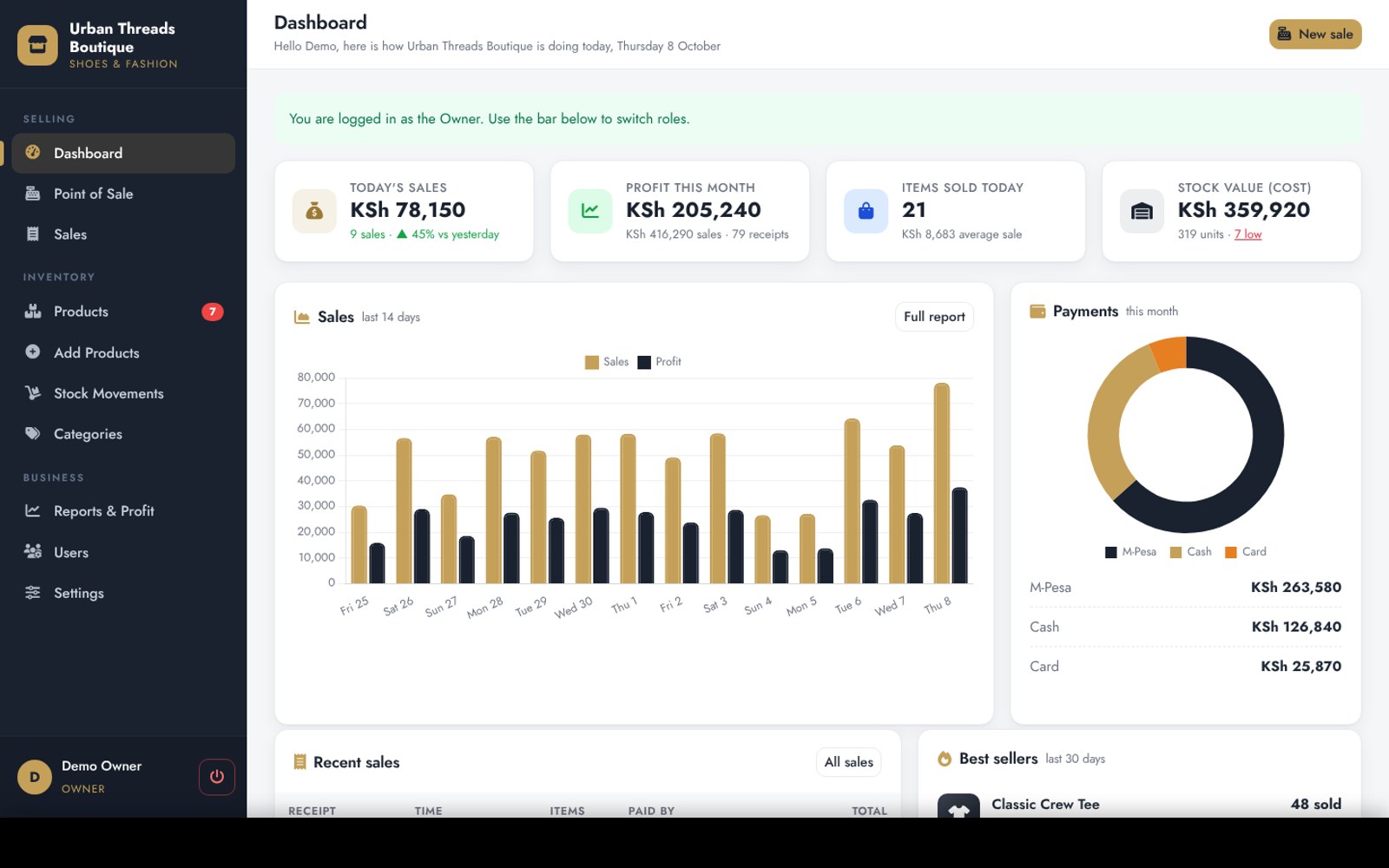
Overview
DukaPOS is a complete point of sale and inventory system for boutiques, shoe shops, minimarts, hardware, cosmetics and phone shops.
Cashiers sell from any phone, tablet or computer. Tap products or scan barcodes, adjust quantities, give a discount and take payment by Cash, Card or M-Pesa. With M-Pesa, the till can send a PIN prompt straight to the customer's phone and the sale completes automatically, or the cashier simply types the M-Pesa code. Receipts print on 58 mm and 80 mm thermal printers with your logo, address and KRA PIN.
Stock goes down with every sale. Record stock received from suppliers, damages, customer returns and shelf counts, and every change is kept in a history. Low-stock and sold-out alerts tell you what to reorder.
The owner sees today's sales, profit for the month, best sellers, slow-moving stock, and sales by category, payment method and staff member. Every report downloads to Excel.
Owner, Manager and Cashier accounts each have their own permissions, so cashiers only see their own sales and never see buying prices or profit. A one-click installer sets everything up in about 10 minutes, with a sample shop so you can start selling straight away.
Features
- Fast till with product search and barcode scanning
- Cash with change, Card, and M-Pesa by code or PIN prompt
- Printable receipts for 58 mm and 80 mm thermal printers
- Several items per sale, discounts with a limit for staff
- Live stock levels with low-stock and sold-out alerts
- Stock received, damages, returns and stock counts with history
- Buying and selling prices with profit on every sale
- Dashboard with today's sales, monthly profit and stock value
- Reports by day, product, category, payment method and staff
- Best sellers and slow-moving stock
- Owner, Manager and Cashier roles
- Cancel a sale and put the stock back automatically
- Products with size, colour, photo and category
- Add many products at once
- Excel downloads for products, sales and stock
- Works on phones, tablets and computers
- Secure logins with lockout protection
- One-click installer with a sample shop
Installation guide
What you need
- PHP 8.1 or newer
- MySQL 5.7+ or MariaDB 10.3+
- PHP extensions: PDO MySQL, cURL, GD, fileinfo, mbstring
- cPanel hosting with SSL
- Optional: M-Pesa Till or Paybill with Daraja API access
- Optional: 58 mm or 80 mm thermal receipt printer
-
1
Upload the files
In cPanel File Manager, open public_html, upload the ZIP and extract it. Turn on Show Hidden Files so all files are visible.
-
2
Create a database
In cPanel MySQL Databases, create a database and a user, then add the user to the database with ALL PRIVILEGES.
-
3
Run the installer
Visit yoursite.com/install and enter the database details, your shop name, phone and address, and the owner username and password.
-
4
Delete the installer
In File Manager, delete the install folder for security.
-
5
Log in
Go to yoursite.com/login with the owner username and password.
-
6
Set up your shop
Open Settings to add your logo, receipt text, Till number and payment methods.
-
7
Add your stock
Create categories, then add your products with prices and quantities.
-
8
Add your staff
Open Users and create an account for each cashier and manager.
Prefer not to do it yourself? We can install it on your hosting and set up your logo and content for you. Ask for installation help · Full setup guide
Changelog
v1.0.0: Initial release.
Have a system in mind? Let's draw the blueprint.
Tell us what your business needs. We'll map it out and engineer a web application that fits, or start you off with one of our templates.