
Sanctuary – Church Website with M-Pesa Online Giving
A modern church website where members give tithe and offerings by M-Pesa, watch sermons, see events and send prayer requests. Everything is managed from a simple admin panel.
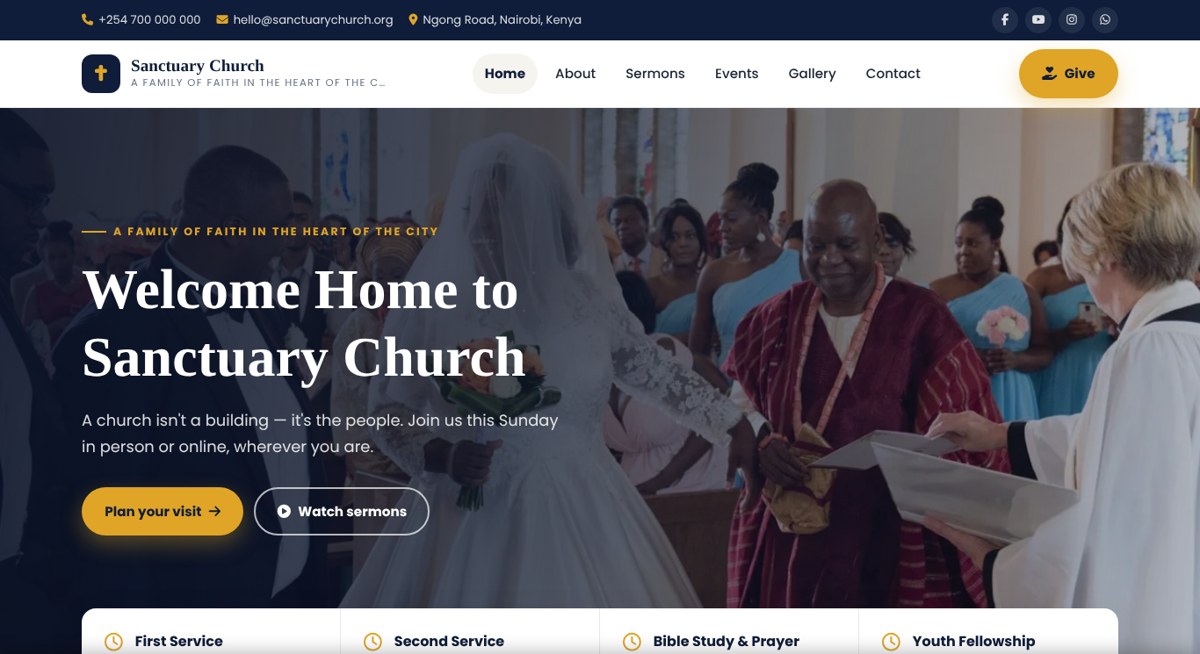
Overview
Sanctuary is a complete, ready-to-launch website for churches and ministries in Kenya. It helps your church grow its online presence and receive giving directly through M-Pesa.
Members give their tithe, offering, building fund or missions contribution straight from the website. They choose a category, enter an amount and their phone number, then confirm with their M-Pesa PIN. Every gift is recorded automatically with its M-Pesa receipt, so the treasurer always has accurate records. Giving reports show totals by month and category, and records for any date range can be downloaded for Excel.
Upload every Sunday's sermon with a YouTube video, audio, scripture reference and notes. Members can search past sermons, browse by series and share messages on WhatsApp and Facebook. Upcoming events show the date, time and venue, with a registration link and an "Add to calendar" button.
Visitors can send prayer requests, plan a visit or ask questions. Messages arrive in the admin inbox with one-tap WhatsApp, call and email replies. A newsletter sign-up builds your church mailing list.
The church office can change everything without coding: church name, logo, service times, photos, the pastor's welcome message, mission, vision, colours, social media links and the Google map. Several admins can be added for the pastor, secretary and treasurer.
The website is fast, works well on mobile phones and is built so Google can find your sermons and events. A step-by-step installer sets everything up in about 10 minutes, and sample sermons, events and photos are included so the site looks complete from day one.
Features
- M-Pesa online giving (Paybill or Till) with automatic receipts
- Giving categories: Tithe, Offering, Building Fund, Missions, Thanksgiving (editable)
- Giving reports by month and category with Excel download
- Sermons with YouTube video, audio, scripture, series and search
- Share sermons on WhatsApp, Facebook and X
- Events with upcoming and past views, registration link and Add to calendar
- Photo gallery with lightbox and bulk photo upload
- Prayer requests, visit bookings and enquiries inbox
- WhatsApp, call and email reply buttons for every message
- Newsletter sign-up with downloadable subscriber list
- Admin dashboard with giving chart, recent gifts and upcoming events
- Edit all text, photos, service times and colours from the admin
- Pastor's welcome, mission and vision sections
- Live stream button for YouTube or Facebook Live
- Google map, social links and WhatsApp contact
- Several admin accounts for pastor, secretary and treasurer
- Mobile-friendly design with slide-in menu
- Google-friendly pages, sitemap and rich results for sermons and events
- Secure login with lockout after failed attempts
- Safe image uploads, auto-resized and compressed
- One-click installer with sample content
- Step-by-step installation guide included
Installation guide
What you need
- PHP 8.1 or newer
- MySQL 5.7+ or MariaDB 10.3+
- PHP extensions: PDO MySQL, cURL, GD, fileinfo, mbstring
- cPanel hosting with SSL (free AutoSSL works)
- M-Pesa Paybill or Till with Daraja API access (for online giving)
-
1
Upload the files
In cPanel File Manager, open public_html, upload the ZIP and extract it. Turn on Show Hidden Files so all files are visible.
-
2
Create a database
In cPanel MySQL Databases, create a database and a user, then add the user to the database with ALL PRIVILEGES.
-
3
Run the installer
Visit yoursite.com/install and enter the database details, your church name, phone, email and address, and your admin email and password.
-
4
Delete the installer
In File Manager, delete the install folder for security.
-
5
Log in to the admin
Go to yoursite.com/admin/login with the email and password you chose.
-
6
Add your church details
Open Website settings to add your logo, service times, photos, pastor's welcome, colours and social links.
-
7
Set up M-Pesa giving
In Website settings, open Giving and M-Pesa, enter your Daraja keys, test with KES 1 in Sandbox, then switch to Live.
-
8
Add your content
Replace the sample sermons, events and gallery photos with your own.
Prefer not to do it yourself? We can install it on your hosting and set up your logo and content for you. Ask for installation help · Full setup guide
Changelog
v1.0.0: Initial release. M-Pesa online giving, sermons, events, gallery, prayer requests, newsletter, admin dashboard and installer.
Have a system in mind? Let's draw the blueprint.
Tell us what your business needs. We'll map it out and engineer a web application that fits, or start you off with one of our templates.